The problem
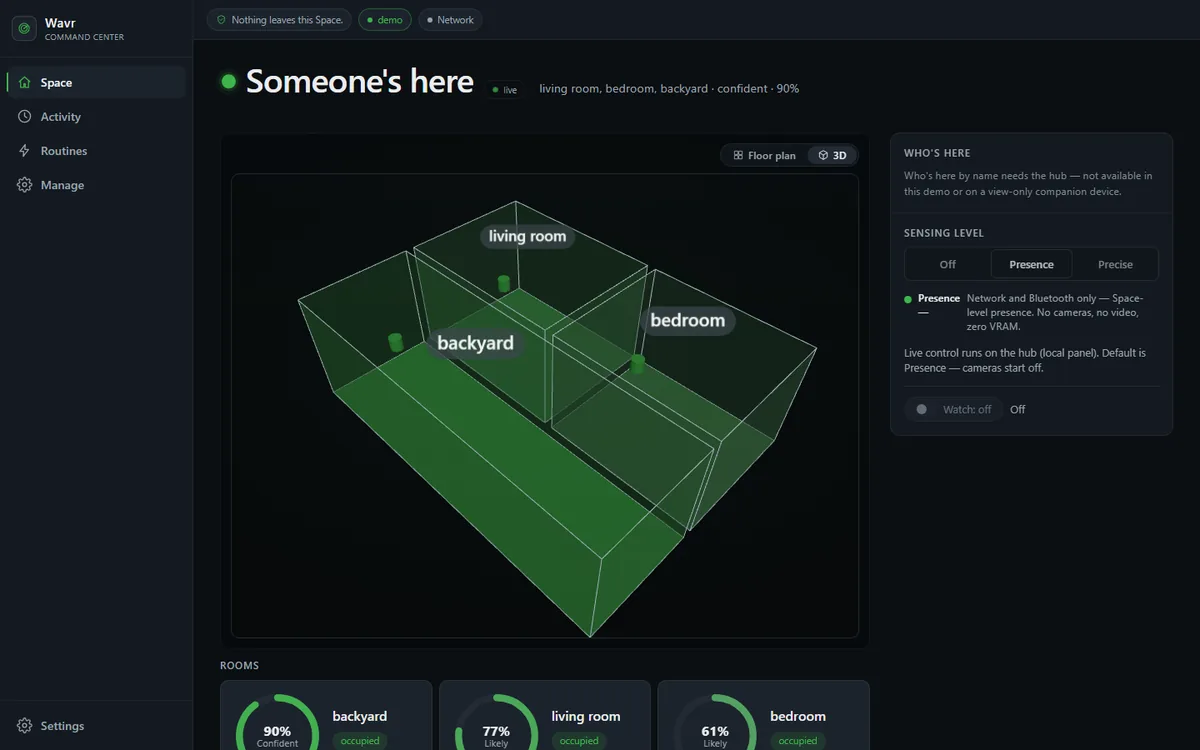
Knowing whether someone is in a room is the input to most useful home automation, and most products get it by sending camera or location data somewhere else. Wavr answers the same question with the data kept on hardware the owner controls, and it has to be honest about uncertainty: when a sensor is off, or nothing covers a room, the answer is "I don't know", not a guess.
Constraints that shaped it
- Privacy decides the defaults: loopback only, cameras off at boot, frames never persisted, positions kept live only.
- It has to be useful with no language model configured at all.
- Heavy dependencies such as vision and Bluetooth are optional extras.
- Every sensor path must be testable without the hardware attached.
Architecture
- SourcesNetwork presence, Bluetooth and camera detection plug in behind one
SensorSourceinterface; Home Assistant, companion phones and sensor nodes feed the same event stream. - EventsEverything becomes a
SensingEvent, with a timebase that corrects for devices whose clocks disagree. - Fusion
FusionEngineweighs each event by source trust, decays it with age, and combines agreement and strength into a confidence per room. - Room stateA
RoomStatecarries each source's share and a plain-language explanation of why the room reads the way it does. - OutputsSQLite written only when the state changes, a live WebSocket, opt-in MQTT, and MCP over stdio or HTTP.
- ClientsThe dashboard, desktop and Android companions, Python, JavaScript and Kotlin SDKs, and AI agents.
Decisions and trade-offs
- Only a camera can say a room is empty.A camera can see a person sitting still; other sources simply go quiet, and silence is not proof of absence. So a fresh camera "nobody here" counts against a room and every other empty reading is ignored.Cost: a room without a camera can take longer to clear.
- Evidence fades, and vacancy waits.A reading keeps full weight for 30 seconds and fades to nothing at 90. A room turns occupied at once but waits 45 seconds before it reads vacant. Only the yes or no is debounced; the confidence stays honest and the explanation shows the countdown.Cost: up to 45 seconds of a room still reading occupied.
- Presence-only sources can mark a room occupied, at low confidence.Without this a home with no cameras could never read occupied at all.Cost: those rooms show lower confidence, and the interface says so.
- Loopback by default, LAN access by choice.LAN clients need the same subnet plus a per-device token, stored as a SHA-256 hash, with roles and scopes, over local TLS.Cost: phones have to be paired deliberately, and there is no access from the internet.
- MCP reads by default.The HTTP transport is off unless enabled, checks the request origin, rate-limits and scopes tools per agent. The only control tool exists on stdio, needs an explicit flag, and goes through Home Assistant with an allowlist.Cost: no remote control, by design.
- Frames and positions are never stored.The vision path keeps images in memory only, and the database has no column for coordinates.Cost: "replay last night" is impossible, deliberately.
What broke, and what I changed
A fast clock froze a room
- Symptom
- A device whose clock ran an hour ahead held its room at high confidence for that whole hour.
- Cause
- A clamp turned timestamps from the future into an age of zero, so the evidence never decayed.
- Fix
- Age is now the distance from now in either direction, with five seconds of tolerance for clock skew.
Sources that disagreed looked like they agreed
- Cause
- The agreement factor in the confidence formula was always 1.0, so it did nothing.
- Fix
- Documented first, then fixed: a fresh camera reading of an empty room now lowers the agreement for that room.
Phantom people on the map
- Cause
- A fusion fix removed the release on a headcount latch, which left people on the map who had left and raised false intrusion alerts.
- Fix
- Release the count on a live camera negative. The first attempt skipped a camera-only condition, and the test for a person sitting still caught it.
A token that did not cover the live stream
- Cause
- The local access token was enforced in HTTP middleware, which never runs for WebSocket connections. The outbound-traffic switch also missed two connectors.
- Fix
- Both closed, with tests, alongside a separate fix that stopped agent devices reading the live vital-signs stream.
The guarantee checker had bugs of its own
- Cause
- A run that errored was scored as a guarantee that held, the restore step missed line-ending rewrites, and the script ran nowhere until it had its own CI job.
- Fix
- An errored run now reports an error instead of a pass, files are restored and compared byte for byte, and CI runs the script as its own job.
Testing
The code states guarantees in plain words, such as "a timestamp is never in the future" or "a frame never reaches the disk". A passing test suite does not prove those; it proves that the tests somebody wrote pass. So the testing is layered around the guarantees.
- Backend: pytest with hardware mocked, so the suite runs without sensors attached. Mocks prove the contract, not the hardware.
- Guarantee mutation:
scripts/check_guarantees.pydeletes each guarantee on its list from the source, runs the tests and fails if nothing notices. It exists because "a timestamp is never in the future" was enforced on three code paths but tested on one: deleting it from either of the other two passed the whole suite. - Privacy: a static test fails if the vision path writes image bytes to disk, and it documents what it cannot catch.
- Browser: Playwright against a real running core. The job fails if the browser cannot launch instead of silently skipping.
- SDKs: the Python SDK without the server installed, the JavaScript SDK with no dependencies, and Kotlin tests on the JVM.
- CI: GitHub Actions chooses what to run from what changed, and runs the browser job whenever it is unsure.
Status and limits
- Version 0.4.0, used by one person in one household. Read the version number accordingly.
- Radar and UWB have code paths tested with mocks only and have not been run on real hardware. Wi-Fi CSI is an interface waiting for a radio that exposes it, not a working source.
- Camera calibration is still in progress, and there is no hosted demo, by design.
- The camera model weights download on first run. Every other outbound connection is an opt-in connector behind one switch.